Every document uploaded to an AI chat leaves the company.

DomKnox DLP reads the file in the browser and stops national ID numbers, customer data and passwords – before the document reaches ChatGPT, Claude or Gemini. Your people keep the AI. You keep control.

Word, Excel, PowerPoint and PDF files are checked locally on the computer. No content is sent to us.

XLSXPayroll_November.xlsxWhat the AI service getsWhat was uploaded
NamePersonal ID no.Salary accountSalary
Anna Testsson811228-9877SE17 5000 … 447741 200
Erik Exempelsson790314-2154SE24 5000 … 485438 900
Maria Provberg850607-3424SE31 5000 … 523144 500
Johan Mallgren920119-5710SE38 5000 … 560836 300
Sara Demosson881130-6642SE45 5000 … 598539 750
Karl Mönsterberg760925-1333SE52 5000 … 636247 100
Lina Fiktivsson951002-4080SE59 5000 … 673935 600
NamePersonal ID no.Salary accountSalary
Anna Testsson[PERSONNUMMER_1][IBAN_1]41 200
Erik Exempelsson[PERSONNUMMER_2][IBAN_2]38 900
Maria Provberg[PERSONNUMMER_3][IBAN_3]44 500
Johan Mallgren[PERSONNUMMER_4][IBAN_4]36 300
Sara Demosson[PERSONNUMMER_5][IBAN_5]39 750
Karl Mönsterberg[PERSONNUMMER_6][IBAN_6]47 100
Lina Fiktivsson[PERSONNUMMER_7][IBAN_7]35 600
DomKnox
Drag the line across the document. The check happens on the computer, before the file leaves it.
Checks uploads toChatGPTClaudeGeminiCopilotMistralPerplexityand your own AI tools

Nobody means to leak anything. It happens anyway, one document at a time.

AI chats have become an everyday work tool. The documents uploaded there end up with an external provider – often outside the EU, often on a personal account with no agreement in place. It shows up in no log and cannot be undone.

XLSXPayroll_November.xlsxto an external AI service

Finance, Tuesday morning

The payroll needs reconciling. The Excel file with names, ID numbers and account numbers for 140 employees is uploaded with the question why don't the totals add up?

PDFCase_48213.pdfto an external AI service

Customer service, a complaint

A case needs a quick reply. The whole case is uploaded – with the customer's ID number, address and details of a sick leave – and the request write a friendly reply.

ENVproduction.envto an external AI service

IT, late in the evening

A configuration file is uploaded for troubleshooting. It contains the database password, an API key and internal server addresses.

What is at stake

4 %

GDPR. Fines of up to 20 million euros or four per cent of global annual turnover. Disclosing personal data to an AI service without a legal basis and a data processing agreement can be a personal data breach that must be reported.

2 %

NIS2. Essential entities can face fines of up to ten million euros or two per cent of turnover. Management must approve and oversee the security measures – and can be held liable.

1 file

Trust. A single customer register or a single file of passwords in the wrong place is enough. Banning AI does not work either – it gets used anyway, on personal accounts.

A guard in the browser, between the employee and the AI service.

DomKnox DLP is an extension for Chrome and Edge. It opens and reads every document that is about to be uploaded or dragged into an AI chat – and acts on the company's own rules before the file is sent. Pasted text is checked the same way.

  1. Add to Chrome

    Install

    Employees add the extension from a link – or IT rolls it out to every computer through Intune or Group Policy.

  2. DK-7F3A-92QXActive

    Activate with the company code

    The code links the extension to your company and your rules. Without an active code the extension does nothing.

  3. Blocked: Customer_register.xlsx

    Work as usual

    Clean documents upload as usual. Documents with sensitive content are blocked, trigger a warning or are sent as a copy with the data replaced by placeholders.

Block

Customer registers, documents marked confidential and files with passwords or keys. The file is not uploaded.

Customer_register.xlsxstopped

Redact

A copy of the document is sent, with ID numbers and account numbers replaced by [PERSONNUMMER_1]. The AI can still help.

811228-9877becomes[PERSONNUMMER_1]

Warn

Documents with email addresses or internal details – and files that cannot be read. The employee sees what was found and decides.

Quote_draft.docx2 email addresses

What DomKnox finds in the documents.

Every file is opened and read locally, including metadata and numbers in spreadsheets. Numbers are validated against check digits and dates, so order numbers and ordinary dates do not raise false alarms.

Personal data

National identity numbers from the Nordics and the rest of the EU, passport numbers, bank accounts and card numbers – and sensitive data such as health or trade union membership when it is linked to a person.

811228-9877SE45 5000 0000 0583 9825 7466anna.testsson@exempel.seon sick leave010190-1234

GDPR

Passwords and keys

Passwords, API keys, private keys and connection strings.

AKIAIOSFODNN7EXAMPLEpostgres://admin:••••@db01

NIS2

Internal IT information

Internal IP addresses, server names and firewall configuration.

10.20.30.40fs01.corp.local

NIS2

The company's own terms

Customer names, project names and number formats that you add yourselves. Documents marked confidential.

KD-004211Project EagleCONFIDENTIAL

Your rules

Document types

Scanned PDFs, images and password-protected files cannot be read – there you choose whether the extension should warn or block.

DOCXXLSXPPTXPDFCSVTXTODT

Built so that IT can say yes.

  • Local checking. Documents are opened and checked on the computer. Only the licence check and a log without content are sent to us.
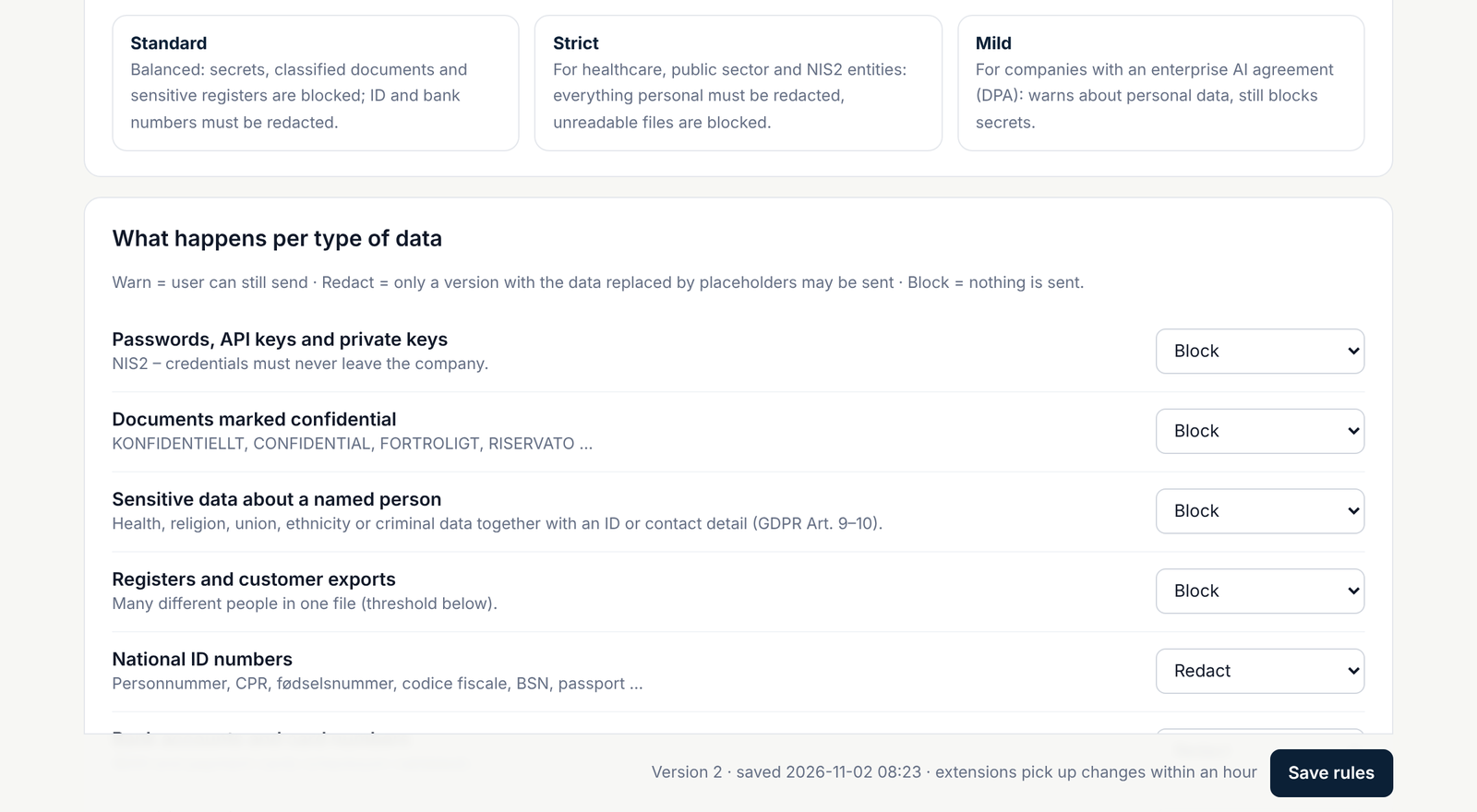
  • Rules per company. You decide what is blocked, redacted or allowed – and add your own terms. Changes reach every computer within an hour.
  • Central rollout. Intune, Group Policy, Google Admin or the Edge management service. The code can be pushed so nobody has to type anything.
  • Narrow permissions. The extension only runs on known AI services and the tools you add yourselves.
  • Traceability. In the account panel you see how many people are protected and what has been stopped – without anyone being able to read the content itself.
domknoxdlp.com/app
The account panel: rules per data type, with choices such as Block and Redact
The account panel, where your company controls the rules.

A fixed price per month. No consultancy hours.

You pay a fixed monthly fee for the company, based on the number of users. Installation, updates and the account panel are included.

  • Extension for Chrome and Edge for all employees
  • Account panel with your own rules
  • Log of what has been stopped, without content
  • Help with rollout through Intune or Group Policy

Tell us a little about yourselves and we will show you how it works with your own documents – it takes half an hour.

Frequently asked questions

Which document types are checked?

Word, Excel, PowerPoint, PDF, OpenDocument, CSV, text files and code. Scanned PDFs, images, archives and password-protected files cannot be read – there you choose whether the extension should warn or block.

Are our documents sent to DomKnox?

No. All checking happens locally in the browser. Only the licence check and a log of metadata are sent to our server – which AI service, which decision and which type of data was found. Never the content or the values that were found.

Which AI services are covered?

ChatGPT, Claude, Gemini, Microsoft Copilot, Mistral, Perplexity, DeepSeek and more – plus the internal AI tools you add yourselves in the account panel.

Which browsers does it work in?

Google Chrome and Microsoft Edge on Windows and Mac.

Does it protect the desktop and mobile AI apps?

No, the extension protects AI used in the browser. We recommend blocking the desktop apps through Intune or Group Policy, so that all AI use goes through the browser where DomKnox checks it. We help with the settings.

Can we have our own rules?

Yes. Every company has its own rules in the account panel: what should be blocked, redacted or only warned about, your own words and number formats, and which AI services to cover. Passwords and keys are always blocked.

Does DomKnox make us GDPR and NIS2 compliant?

DomKnox is a technical safeguard that supports your GDPR and NIS2 work by reducing the risk of personal data and security information ending up with external AI services. It does not replace your own legal assessment or your agreements with the AI providers.

How quickly can we get started?

The same day. You get a company code and an installation link. With Intune or Group Policy, IT rolls the extension out to every computer at once.